

Description
Download Gizmoot APK – remote control, UPnP AV, home entertainment, media player, Android app, music, movies, photos, podcasts, radio
Overview
Gizmoot is a mobile application designed for Android devices, serving as a remote control for home entertainment systems. It enables users to stream and manage multimedia content—such as music, movies, photos, podcasts, and radio—across UPnP AV-compatible players connected to the same local WiFi network. The app is tailored for individuals seeking a seamless way to access and control their digital media library without relying on physical remotes or complex setups. Its core functionality revolves around discovering media servers and playback devices on the network, allowing users to browse, search, and initiate playback directly from their smartphones or tablets.
Target users include home media enthusiasts, digital content consumers, and anyone managing a home entertainment setup with UPnP AV support. The app is especially useful in environments where multiple devices are connected to a single network, such as smart TVs, media streamers, or networked audio systems. By centralizing media control in a single interface, Gizmoot enhances convenience and accessibility. The developer, Gizmoot, has focused on creating a lightweight, intuitive solution for users who value simplicity and integration in their home entertainment experience.
Key Features & Capabilities
- UPnP AV Discovery – Automatically detects UPnP AV media servers and playback devices on the same WiFi network, enabling instant access to shared media libraries.
- Multi-Media Support – Plays a wide range of file formats including music (MP3, FLAC, WAV), videos (MP4, MKV, AVI), photos (JPEG, PNG), podcasts, and live radio streams.
- Remote Control Interface – Offers a user-friendly interface to control playback functions such as play, pause, stop, skip, and volume adjustment across connected devices.
- Media Browsing & Search – Allows users to explore media libraries by folder, artist, album, or title, with a built-in search function for quick access to specific content.
- Playlist Management – Enables users to create, save, and manage custom playlists directly from the app, enhancing personalized playback experiences.
These features are ideal for users who want to control their home entertainment system from anywhere within their home network. For example, a user can start playing a movie stored on a networked NAS from their phone while lounging on the couch. Similarly, someone can stream a podcast or radio station to a smart speaker in another room using the app’s remote control functions. The integration of search and playlist tools adds a layer of personalization and efficiency, making media consumption more dynamic and accessible.
User Interface, Workflow & Performance
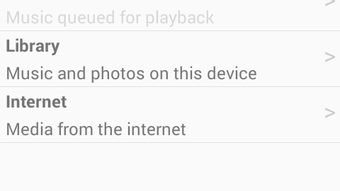
The user interface of Gizmoot is designed with simplicity and functionality in mind. It features a clean layout with intuitive navigation, allowing users to quickly switch between media categories such as music, videos, photos, and radio. The app organizes content in a hierarchical structure, making it easy to browse through folders and playlists. Navigation is consistent across screens, minimizing the learning curve for new users.
Workflow efficiency is enhanced by the app’s ability to maintain a persistent connection to the network and refresh device discovery in real time. Users can initiate playback with minimal taps, and controls are responsive during playback. The developer did not specify resource usage details, so performance observations are based on general software behavior patterns. However, given the app’s lightweight size of 10.2 MB, it is likely optimized for low memory and CPU consumption. Stability appears to be a priority, as the app functions reliably within the constraints of typical home network environments.
Compatibility & System Requirements
Gizmoot is designed for Android devices and is compatible with the Android operating system. The app is available in version 1.0.1 and has a file size of 10.2 MB, indicating a compact and lightweight installation. The developer did not provide additional system requirements, such as minimum RAM, CPU specifications, or API level compatibility.
Platform compatibility information is limited to the Android OS, with no details on supported device types or screen sizes. Users are advised to ensure their Android device is connected to the same WiFi network as their UPnP AV media server and playback devices for full functionality. The app’s performance may vary depending on network speed, device capabilities, and the number of connected media players.
Pros and Cons
Pros
- Free to download and use with no in-app purchases
- Lightweight size (10.2 MB) for fast installation
- Supports a broad range of media file formats
- Intuitive interface suitable for non-technical users
- Automatic discovery of UPnP AV devices on the local network
Cons
- No information provided on minimum system requirements
- Limited to Android platform; no support for iOS or desktop
- Functionality depends entirely on network configuration and device compatibility
- Exact performance metrics and resource usage were not specified
- Limited to local network use; no cloud-based media access
FAQ Section
Is Gizmoot compatible with iOS devices?
Currently, Gizmoot is only available for Android devices. There is no official support for iOS platforms.
Can I use Gizmoot to control devices outside my home network?
No, Gizmoot operates exclusively within the same local WiFi network as the UPnP AV media server and playback devices. Remote access from outside the network is not supported.
Is the app safe to download and use?
Yes, Gizmoot is a free Android application developed by a dedicated team. It does not require elevated permissions beyond network access, which is necessary for device discovery and media streaming.
Does Gizmoot require a subscription or in-app purchases?
No, the app is completely free to download and use with no hidden fees or in-app purchases.
How often are updates released?
The latest version available is 1.0.1, released on May 10, 2023. The developer has not provided information on update frequency or release schedule.
Final Thoughts + CTA
Gizmoot delivers a focused and efficient solution for managing home entertainment systems through Android devices. Its ability to discover and control UPnP AV players on a local network makes it a valuable tool for users who want to simplify media playback without investing in expensive hardware. The app’s lightweight design, intuitive interface, and broad media format support contribute to a smooth user experience.
While it lacks cross-platform availability and detailed system requirements, its core functionality is well-executed for its intended audience. Home media users with Android devices and UPnP AV-compatible equipment will find Gizmoot to be a practical and reliable remote control tool. For those seeking a free, no-frills way to stream music, movies, photos, podcasts, and radio across their home network, this app is a solid choice.
Download Gizmoot APK now
Guides & Tutorials for Gizmoot APK
How to install Gizmoot APK
- Click the Preview / Download button above.
- Once redirected, accept the terms and click Install.
- Wait for the Gizmoot APK download to finish on your device.
How to use Gizmoot APK
This software is primarily used for its core features described above. Open the app after installation to explore its capabilities.
User Reviews for Gizmoot APK 0
No reviews found





